
 Skip to content
€60,00 Original price was: €60,00.€29,00Current price is: €29,00.
Digitally delivered by email within a few minutes after payment confirmation. These are ESD digital licenses — all product keys are original and have no expiration date. They can be reinstalled on the same activated device at any time.
By purchasing this product, you will receive the digital software download from our servers along with the product key needed for software activation, as well as detailed installation instructions.
License previously used and relinquished by the former owner in compliance with CJEU ruling C-128/2011 :
100% authentic digital products with official vendor warranties, ensuring genuine licenses.
Enjoy peace of mind with a 30-day return policy on all digital products. Full refunds or exchanges for any issues.
Your payments are fully secure with our encrypted transaction network. Shop with confidence.
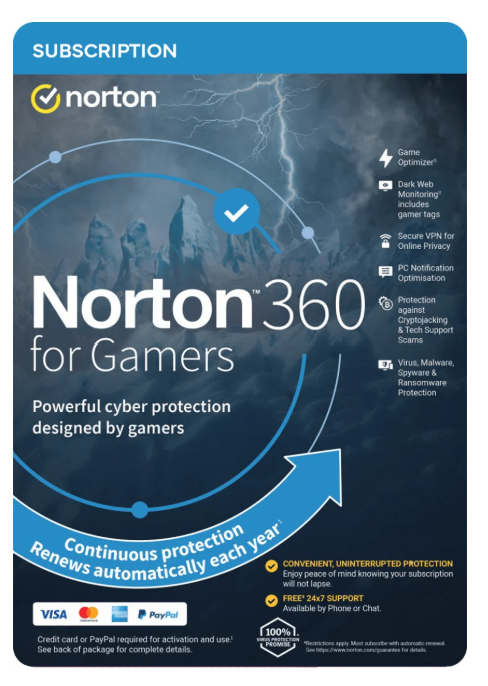
Gamers need more than just antivirus protection.
Norton 360 for Gamers offers advanced, multi-layered security for PCs. It helps protect against online threats like malware and webcam takeovers. It also includes a VPN that strengthens your protection against DDoS attacks, doxxing, and swatting.
Notifications are optimized to minimize interruptions during gameplay. In full-screen mode, all notifications are muted except for critical security alerts. For an optimized gaming experience, Game Optimizer also allocates dedicated CPU cores to the game.
Game Optimizer:
This feature optimizes game performance by allocating games their own CPU cores on PCs equipped with multi-core processors.
Darknet monitoring:
We monitor the darknet and notify you if we find your personal data, including your gamertags, usernames, and email addresses.
Secure VPN:
Surf more securely and anonymously by hiding your IP address with a no-logs VPN to increase your protection against DDoS attacks, doxxing, and swatting.
SafeCam for PC:
Notifies you of attempts to access your webcam so you can block them. This helps you better protect yourself against potential streaming bans and avoid embarrassment.
Password Manager:
A strong password is important for better securing your gaming accounts. Let us help you back up complex passwords, credit card information, and other login data online—safely and securely.
50GB Online Backup:
Automatic cloud backup for PCs: Back up your online gaming clips to free up space on your hard drives.
Real-time threat protection:
The latest multi-layered security helps protect your devices against known and emerging malware threats, including email phishing attacks and security vulnerabilities in games and websites.
Optimized notifications:
We only notify you when your Windows PC is under attack, your protection is compromised, or you’re not using a feature you’re entitled to. Product and service recalls are in your control.
Phishing protection: Phishing
protection analyzes the security level of websites you visit and lets you block sites known to be fraudulent.
Smart Firewall for PC or Firewall for Mac®:
Helps protect your device and the data stored on it from malicious attacks and prying eyes, even while gaming.
Intrusion Prevention Scan:
Analyzes incoming data and helps block potential online threats before they reach your computer.
Device Security:
Protects up to 3 devices in real time against ransomware, viruses, spyware, malware, and other online threats.
Web Isolation Mode:
Helps better secure sensitive information you enter online (for example, when logging into your bank or gaming account). Thanks to virtualization technology, website browsing is routed through a Norton server, giving you added protection against web-based threats.
Parental Controls:
Help your children manage their online activities and detect threats before they become a problem.
Fullscreen detection:
This feature detects when you are using your PC’s fullscreen mode and mutes all notifications except important security alerts.
Game Optimizer:
Allocates dedicated CPU cores to games to ensure an optimal gaming experience.
Guarantees an optimal gaming experience for gamers.¹¹
Game Optimizer is a patented technology for PCs with multi-core processors. It ensures an immersive gaming experience by minimizing sudden performance drops while protecting your computer. Non-essential applications are limited to a single CPU core, freeing up the remaining cores for gaming.
Are you playing in fullscreen mode?
We detect if you’re playing in fullscreen mode and automatically activate silent mode. This suppresses most warning messages and pauses background activities. Only activities that help protect your computer from viruses and other cyber threats are executed. This reduces unnecessary background activity and improves game performance.
Intrusion Prevention Analysis:
Protection against cryptojacking and tech support fraud.
Intrusion Prevention Analysis monitors request and response headers to help prevent browser-based cryptojacking (mining cryptocurrency without your consent) and tech support fraud. This feature also blocks websites that impersonate official support portals.
Notification Optimization:
Are you annoyed by all the notifications on your PC while you’re gaming?
As gamers, we too have often been annoyed by annoying notifications that interrupt the flow of gameplay. In Norton 360 for Gamers, notifications have been optimized: There are fewer notifications, and you have more control over which ones can be permanently muted.
Thanks to this Windows-specific feature, we only notify you if your PC is under attack, your protection is threatened, or you’re not using a feature you’re entitled to. We also give you control over permanently muting feature messages.
So, when you’re gaming, streaming movies, working, or doing other activities on your PC, you won’t be disturbed by unnecessary pop-ups.
Most warning messages in Windows can be dismissed if full-screen mode is used.
The “Norton Cloud-Backup” and “Norton SafeCam” features are only available on Windows (except for Windows 10 in S mode; Windows on PCs with ARM processors).
Game Optimizer is only available on PCs with at least four processor cores running Windows (excluding Windows 10 in S mode; Windows on PCs with ARM processors).
Parental control features are not supported on Mac systems or Windows 10 in S mode.
Dark web monitoring is not available in all countries. The information monitored depends on your country of residence. By default, the feature monitors your email address, and the process begins immediately. Log in to your account to enter more information about the monitoring.
PAYMENT METHOD INFORMATION REQUIRED FOR AN ANNUAL SUBSCRIPTION: You are purchasing a recurring subscription that will automatically renew after the first year. To activate your subscription, you must register online and provide your billing information. The price paid today is valid for the first year of your subscription. After that, the subscription will automatically renew annually and be billed at the current renewal price, which you can find on [link to subscription page]. fr.norton.com/pricing. This price is subject to change. However, we will always notify you in advance by email.
Your subscription provides protection for the number of devices indicated for the duration of the subscription, which begins on the online activation date. It may contain product, service, and/or security updates and features that may be added, changed, or removed in accordance with the applicable License and Service Agreement, available at nortonlifelock.com/legal/license-services-agreement. You must download and install the product separately for each device to activate protection.
Data collection, storage, and use are subject to the NortonLifeLock General Privacy Statement, available at nortonlifelock.com/privacy.
| Operating System: |
Android
Android 10 (Android Q)
Android 11 (Red Velvet Cake)
Android 12 (Snow Cone)
Android 13 (Tiramisu)
Android 14 (Upside Down Cake)
Android 15 (Vanilla Ice Cream)
Android 16 (Baklava)
iOS
iOS 26
iPadOS
|
| Included Applications: |
Cloud Backup
Dark Web Monitoring
Firewall
Gamer Mode
Password Manager
Virus Protection
SafeCam
Child Safety
VPN
|
Reviews
There are no reviews yet.