 Skip to content

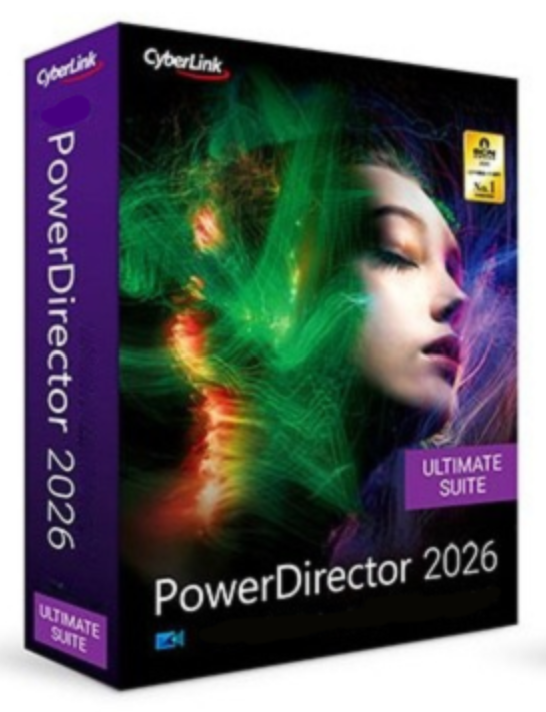
In an increasingly digital world, where visual content makes the difference between grabbing attention and going unnoticed, powerful and versatile video editing software is essential. Cyberlink PowerDirector 2026 Ultimate offers a comprehensive solution that combines precision, efficiency, and creative flexibility in a single platform. This version caters to both ambitious amateur filmmakers and professional video producers, enabling the creation of high-quality videos quickly and intuitively. From advanced timeline editing and AI-powered effects to extensive export and production options, PowerDirector 2026 Ultimate provides a complete suite of tools that streamline the entire video production process.
Swap the sky in your videos effortlessly – whether it’s a dramatic sunset, dancing northern lights, a clear starry sky, or your own image templates.
Automatically detect multiple faces in the video, selectively pixelate or blur them and adjust them.
Applies stunning visual effects to people or objects in motion.
With customizable templates, easily create split-screen video collages with animated intros and outros.
Create movie-worthy green screen effects with the enhanced Chroma Key engine and Multi Key color sampling.
Create custom masks to highlight or strategically overlay titles, images, graphics, or videos.
Choose from 9 blending modes for impressive video overlays.
With advanced keyframing, effects, animations, and masks can be precisely adjusted according to your creative wishes.

TransitionsConnect your clips to a multitude of designs.
Animated stickersDiscover stickers in categories like 3D special effects, travel and leisure.
Customizable animated titlesAdd titles with motion graphics or sound effects.
Animated overlaysAdd fade patches, light leaks, film grain, or other overlays.
Background music & sound effectsThe right soundtrack gives your video a unique touch.
Stabilize the video |
Correct any shaky images immediately. |
Change the video speed |
Speed up or slow down clips directly. |
Color matching |
Match the tones of different cameras. |
LUTs |
Style the video in a targeted way with different looks. |
Partial tint |
To enhance or reduce colors in a targeted way. |
HDR effect |
Highlight high contrasts and intense colors. |
Color correction |
Automatically improve colors, contrasts, and quality. |
Lens correction |
Remove keystone, fisheye and vignetting defects. |
Pan & zoom effects |
To draw attention in a targeted way to captivating areas. |
Record the screen and webcam simultaneously, export the clips separately.
Faster rendering of the highest quality – perfectly suited to 14th generation Intel CPUs.
Utilizes the power of AI and NVIDIA Broadcast for ultra-sharp audio and video quality.
Cyberlink PowerDirector 2026 Ultimate presents itself as a comprehensive, powerful, and versatile video editing software, specifically designed for ambitious amateur filmmakers and professional content creators. The software combines precision, creative freedom, and efficiency in a single platform, enabling the rapid creation of high-quality videos.
With advanced AI-powered features like sky replacement, object effects, face pixelation, green screen, video collages, masks, blending effects, and precise keyframing, visual effects can be achieved effortlessly and professionally. Built-in tools for transitions, animated stickers, titles, overlays, background music, and sound effects ensure seamless interaction between image and sound.
The software offers powerful video functions for stabilization, speed adjustment, color correction, LUT integration, HDR optimization, lens correction, and pan and zoom effects to make the editing process efficient and creative. In the field of audio, PowerDirector 2026 Ultimate guarantees impeccable sound quality: from automatic speech-to-text conversion, AI voice distortion, noise reduction, de-reverb, vocal remover, audio ducking, and Smart Fit, all the tools are provided to optimally adapt the sound to your videos.
The production is complemented by optimized screen recordings, improved performance thanks to modern Intel processor optimization and GPU support by NVIDIA Broadcast, so that audio and video can be edited with the best possible quality.
| System requirements | |
|---|---|
| Operating system | Microsoft Windows 11 (64-bit only, Windows 11 ARM64 is supported) |
| Processor (CPU) | Intel: Core™ i-series (6th generation) or higher, Core i7-4770 (Haswell, 4th generation) for AI functions. AMD: Phenom® II or higher, A8-7670K or Ryzen™ 3 1200 and higher for AI functions. |
| Graphics Processing Unit (GPU) | Standard Video: 128MB VGA VRAM or more; 360° Video: DirectX 11 required; AI Plugin: 2GB VGA VRAM or more; NVIDIA Audio/Video Noise & Spatial Echo: GeForce RTX 2060, Quadro RTX 3000, TITAN RTX or more |
| Random Access Memory (RAM) | 8 GB required (16 GB or more recommended) |
| Hard drive space | 7 GB |
| Engraving device | CD burner required |
| Sound card | Windows-compatible sound card required |
| Internet connection | Required for software activation, subscription verification, and online services |
| Screen resolution | 1024 x 768, 16-bit color or higher |
| Support for formats and devices | |
|---|---|
| Video file (import) | H.265/HEVC, MOD, MVC (MTS), MOV (H.264/HEVC/alpha PNG/ProRes), MPEG-1/2, AVI, MP4, MKV, TOD, 3GPP2, VOB, AVCHD, VRO, WMV, DAT, WTV, DV-AVI, Dolby Digital, WebM (VP9), HDR, MXF, V210, XAVC 360° video : MP4 (H.264), up to 4K, 2:1 aspect ratio |
| Audio file (import) | WAV, MP3, WMA, M4A, OGG, FLAC, AAC |
| Audio format (import) | AAC, Dolby Digital, Dolby Digital Plus, WAVE, MPEG-1 Layer III, FLAC, ALAC, ADPCM |
| Photo file (import) | MPO, JPS, RAW, GIF, BMP, JPG, TIF, PNG, animated GIF, HEIC, APNG 360° Photo: JPG/TIF, 2:1 aspect ratio |
| Lookup table (import) | 3DL, CUBE, CSP, CMS, RV3DLUT |
| Device support Video recording | Analog TV receiver, CI/USB recorder (WDM standard) |
| Exporting video files (production) | HD: AVCHD, AVCHD 2.0, MPEG-2 HD, WMV-HD 2K/4K: H.264 AVC, H.265 HEVC, WMV, XAVC S MKV H.264/H.265 with LPCM/AAC stereo/5.1 MPEG-2/MPEG-4 (.MPG/.MP4) with LPCM/AAC AVCHD2.0 for memory card/flash, image sequence (JPG/PNG), 360° video MP4 H.264/H.265 |
| Exporting audio files (production) | AAC (.M4A), WMA, LPCM (.WAV) |
| Disc creation | 3D DVD/AVCHD/BD disc, DVD, BD BDMV, AVCHD disc, DVD & BD with LPCM 2ch |
Reviews
There are no reviews yet.