Discount up to 35% for first purchase only this month.
Sale!

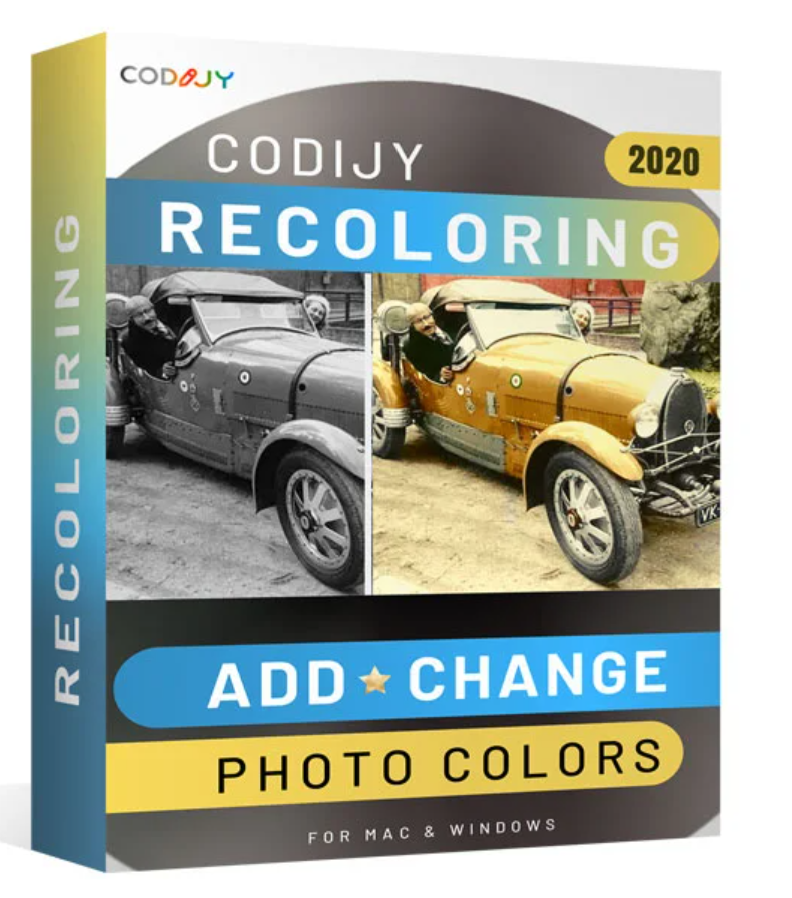
Codijy recoloring

Original price was: 149.00 €.Current price is: 99.00 €.

Digitally delivered by email within a few minutes after payment confirmation. These are ESD digital licenses — all product keys are original and have no expiration date. They can be reinstalled on the same activated device at any time.

By purchasing this product, you will receive the digital software download from our servers along with the product key needed for software activation, as well as detailed installation instructions.

License previously used and relinquished by the former owner in compliance with CJEU ruling C-128/2011 :

  • License valid for 1 device
  • Compatible with Windows
  • Instant digital delivery
  • 24/7 support, also available via WhatsApp
  • No expiration
  • Reusable after formatting
  • Lifetime updates
Add to Wishlist
Add to Wishlist
Original Product

100% authentic digital products with official vendor warranties, ensuring genuine licenses.

30 Days Warranty

Enjoy peace of mind with a 30-day return policy on all digital products. Full refunds or exchanges for any issues.

100% Secure

Your payments are fully secure with our encrypted transaction network. Shop with confidence.

Description

Codijy recoloring

  • Colorize your black and white photos.
  • Bring the family story to life with color photos.
  • Design classic images for posters, websites and other decorative purposes.
  • Experiment with different color combinations for your car, your home, or your interior decor.
  • You will also receive a detailed 50-page user guide that will answer all your coloring questions!
    GIVE BLACK AND WHITE PHOTOS A NEW LEASE ON LIFE!

    Revitalize old family photos, create classic illustrations, experiment with color combinations, and much more! With this easy-to-use photo editing software, you can colorize black and white photos without needing the experience of a graphic designer! Simply draw colored strokes over an area—the program automatically applies the color to the selected area.

    Photo editing and colorization are easier than ever!

    What does the color mean?

    Colorization is a photo editing technique that adds natural and realistic colors to black and white images. The procedure is as follows: First, select the colors, then draw single-color strokes over the objects in the photo. The program processes the image and automatically applies the selected colors to the underlying areas, taking into account the surface and boundaries.

    Key facts

    Photo editing and colorization are easier than ever!

    • Bring the family story to life with color photos
    • Refresh historical photos and participate in the “History in Color” movement
    • Experiment with different color combinations for your car, your home, or your interior decor.
    • Design classic images for posters, websites and other decorative purposes.


    Easy photo colorization:

    Extended color options are available through the extended color selection. Simply select the desired colors from the palette for each channel, enter them manually, or paste the copied hexadecimal values. Thirty-two color libraries contain the most popular photographic objects and materials, as well as multicolor gradients and monochrome tones.

    Apple Project

    Whether you are an experienced photographer or an amateur – the possibilities for creative coloring are almost limitless.

    • Add the color of the original scene to the black and white photos.
    • Refresh faces, objects and other elements in color photos.
    • Convert color photos to black and white images.
    • Create entirely new images by combining black and white and color elements.

    User manual

    You will also receive a detailed 50-page user guide that will answer all your coloring questions!

    Colorize your photos in 3 steps!

    Simple procedure – photorealistic results

    Now anyone can create stunning , photorealistic results , and you don’t need to be a graphic designer. Thanks to Codijy Recoloring ‘s innovative features , coloring and refreshing photos becomes child’s play. From start to finish, you’ll be guided step-by-step through the process, learn the basics of coloring and color selection, and benefit from a productive and user-friendly work environment.

    • Step 1: Select the desired color from a toolbox.
      Color selection, color libraries, gradient settings, the gradient detection tool and the gradient itself ensure the correct color selection.
    • Step 2: Quickly draw several lines on the area to be colored.
      The exposed area is automatically colored (thanks to intelligent image processing algorithms).
    • Step 3: Refresh the image and apply smart gradients to achieve vibrant and consistent colors.
      With your new color photos, you’ll make an impression everywhere!
    New in version 3.7

    NEW! CODIJY offers 100 color libraries

    The new CODIJY offers a true selection of ready-to-use colors. 70 new libraries have been added, significantly expanding your selection for portraits, landscapes, street scenes, and more.


    NEW! Libraries now contain colors and gradients.

    Gradients are important when coloring portraits and other objects that are a mixture of colors.

    The ready-to-use gradients in the new libraries help you master multicolor masks and allow for quick selection of the most common objects.


    NEW! Exciting new topics proposed

    New libraries are offering ideas for new coloring topics.

    • Classic cars
    • Life on the street
    • Military
    • Space
    • Solar system
    • Food, fruits and vegetables
    • Fauna and flora
    • Pets
    IMPROVED! Ergonomics and user-friendliness
    Makes masking colors easier
    A series of new links allows you to draw a complete mask without having to release the mouse button.
    • Press spacebar Cut lines
    • Press and hold the space bar to change the hiding mode
    • Press the Esc key to delete the last line
    Project Explorer
    • Open the files in the project explorer
    • Indicates the location of the last used folders in the documents
    • Change the size of the preview for recently used files
    System requirements
    Version 3.7
    Operating system Windows 7, Windows 8, Windows 10
    • 1.5 GHz processor
    • 5.5 GB of hard drive space
    • 1 GB of RAM
    • CD/DVD Player
    • Internet connection

Reviews

There are no reviews yet.

Be the first to review “Codijy recoloring”

Your email address will not be published. Required fields are marked *