
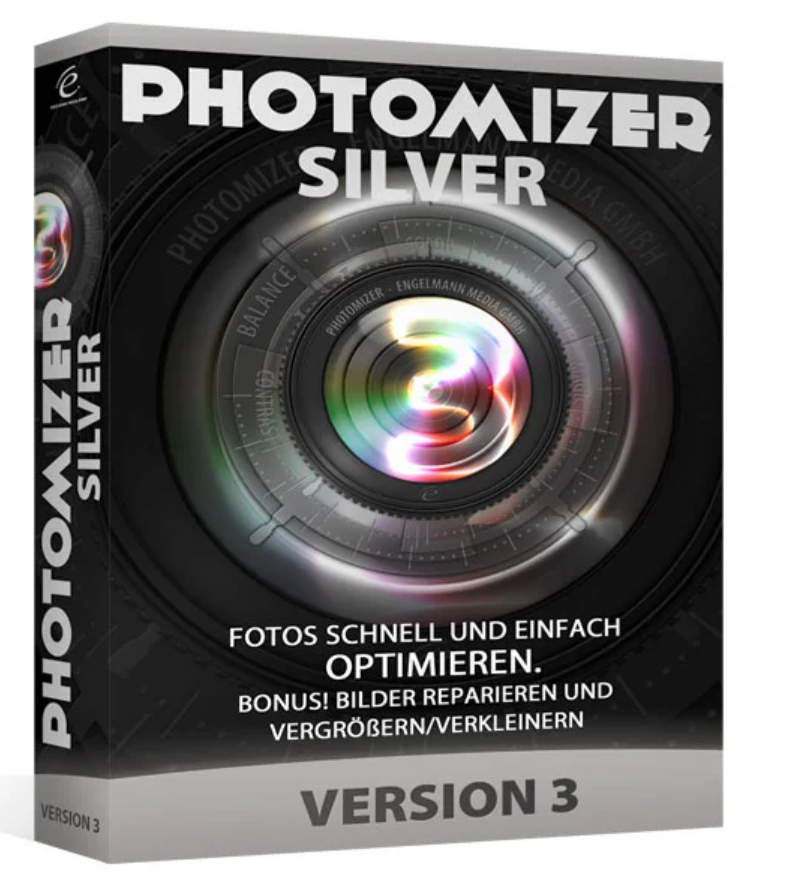
99.00 € Original price was: 99.00 €.69.00 €Current price is: 69.00 €.
Digitally delivered by email within a few minutes after payment confirmation. These are ESD digital licenses — all product keys are original and have no expiration date. They can be reinstalled on the same activated device at any time.
By purchasing this product, you will receive the digital software download from our servers along with the product key needed for software activation, as well as detailed installation instructions.
License previously used and relinquished by the former owner in compliance with CJEU ruling C-128/2011 :
100% authentic digital products with official vendor warranties, ensuring genuine licenses.
Enjoy peace of mind with a 30-day return policy on all digital products. Full refunds or exchanges for any issues.
Your payments are fully secure with our encrypted transaction network. Shop with confidence.
PHOTOMISEUR 3 AILENT – THE SOLUTION TO YOUR PROBLEMS
It’s frustrating: even with the best cameras, you often only get mediocre results. People often think, “Your own photos could be so much better.” It’s important to enhance the colors, sharpen the image, and bring out the details. Most of the time, the brightness needs adjusting, as most digital images are far too dark. Do you also want to edit scanned photos? How about software that handles image optimization and photo repair while being intuitive to use?
EDIT YOUR PHOTOS WITH A SINGLE CLICK OF THE MOUSE
The Photomizer 3 Silver lets you get the most out of your photos—with just one click. You’ll achieve perfect results without any training period. Even if you want to optimize a large number of photos, it’s no longer a problem thanks to the batch processing function. Existing profiles make it easier to find the right settings.
Photos that would otherwise end up in the Windows Recycle Bin can be easily recovered with Photomizer 3 Silver . A single click is all it takes to enhance your photos. For example, gray haze is automatically removed by the software. This gives images a new vibrancy, colors shine brightly again, outlines become sharper, and more detail is revealed.
OPTIMIZE YOUR PHOTOS
The built-in batch mode makes it easy to optimize even large quantities of images without altering the originals. You can determine the extent to which you want to optimize each photo. The preview allows you to compare the original and optimized images at any time.
Photomizer 3 Silver also optimizes scans of old slides and paper prints without any problems. It doesn’t matter if an image is noisy or if artifacts or cracks appear on a scan: the software corrects these errors completely automatically.
What’s new ?
NEW! Improved optimization algorithm
NEW! 12 times faster
NEW! A simple user interface
NEW! Remove red-eye
NEW! Support for over 30 file formats
NEW! Compatible with Windows 10
Functions
Numerous parameters
Photomizer 3 automatically optimizes your photos. The software takes into account aspects such as color matching, object detection, tonal redistribution, white balance, sharpening and hue adjustment, saturation, contrast optimization, and light/shadow correction. You can also adjust settings for detail and color visibility, compensation for dull colors, removal of gray haze, fog, or other negative weather effects, and elimination of unwanted color casts.
Supported output formats
Memory-efficient JPG for web applications, mobile devices and on-screen reading, and BMP for permanent archiving in high resolution and corresponding detail.
Noise-canceling filter
The photomizer 3 is designed to eliminate noise (de-noise), for example when taking photos in unfavorable lighting conditions.
Rotation
Is the photo sideways? No problem, just put it in the right position!
Supports numerous input formats
Photomizer 3 reads, in addition to the usual JPG, BMP and TIFF formats, also many RAW formats (*.raw, *.crw, *.orf, *.3fr, *.nef, *.raf, *.mrw, *.nrw, *.dng, *.cr2, *.arw, *.x3f, *.rw2).
Series conversion
Fully automatic batch mode for handling entire image collections. If desired, all original file paths are preserved during the backup process.
Non-destructive image processing
The original photo remains unchanged at all stages
Manual optimization
Additional options for individual post-processing of individual images – even in full-screen mode.
Statistical function
Thanks to the statistics function, you always have an overview of the number of photos you have already optimized.
EXIF/GEO
Read and display EXIF and GEO data from digital camera images.
pseudo-HDR function
Create HDR-style images from a single photo!
EXCLUSIVE to the Silver version
REPAIR PACKAGE
Today, almost everyone takes photos with compact cameras and smartphones. But it’s precisely these devices that really take poor lighting conditions seriously. This often results in distracting image noise. The repair kit eliminates this noise and ensures that the true subjects stand out. Even the most challenging original photos can be saved thanks to this automated image processing.
EXPAND/SIZE THE PACKAGE
Anyone can do small calculations with photos. But large ones? This magnification module can handle it! Based on processes like Spline or Lanszos, the Photomizer 3 ‘s resizing module resizes the original image up to 32 times its original size—without pixelation. Perfect for enlarging details as well as photos taken years ago with less powerful cameras.
Supported formats
Input formats
The Photomizer 3 reads common formats like jpg, bmp, and tiff, as well as many less common formats, including numerous RAW formats: jpeg, tif, gif, png, jxr, hdp, wdp, ico, raw, orf, 3fr, raf, nrw, dng, arw, nef, x3f, srw, pef, rw2, mrw, mdc, mef, dcr, erf, crw, mos, cr2, sr2, and of course, raw. The perfect converter!
Output formats
Photomizer 3 stores photos in all market-leading formats: in the most popular jpg and png formats for all web applications, mobile devices and for on-screen viewing, in bitmap (bmp) for permanent archiving in high resolution and corresponding details – and also in tiff, gif and jxr (jpeg jxr).
Versions
| Photomiseur 3 Silver |
Photomiseur 3 Premium |
|
| FUNCTIONS | ||
| OPTIMIZATION Color adjustment, object detection, tonal value redistribution, white balance, re-sharpening… |
✓ | ✓ |
| REPAIR MODULES Eliminates noise and ensures that the actual patterns are highlighted |
✓ | ✓ |
| ENLARGE/RESTRICH MODULES Up to 32 times the size – without pixelation effects |
✓ | ✓ |
| RETRO MODULES Retroactive effects and image frames |
– | ✓ |
| TILT-SHIFT Creates natural tilting effects |
– | ✓ |
System requirements
| Version | 3 |
| Operating system | Windows XP, Windows Vista 32-bit, Windows Vista 64-bit, Windows 7, Windows 8, Windows 10 |
Reviews
There are no reviews yet.