
99.99 € Original price was: 99.99 €.69.00 €Current price is: 69.00 €.
Digitally delivered by email within a few minutes after payment confirmation. These are ESD digital licenses — all product keys are original and have no expiration date. They can be reinstalled on the same activated device at any time.
By purchasing this product, you will receive the digital software download from our servers along with the product key needed for software activation, as well as detailed installation instructions.
License previously used and relinquished by the former owner in compliance with CJEU ruling C-128/2011 :
100% authentic digital products with official vendor warranties, ensuring genuine licenses.
Enjoy peace of mind with a 30-day return policy on all digital products. Full refunds or exchanges for any issues.
Your payments are fully secure with our encrypted transaction network. Shop with confidence.
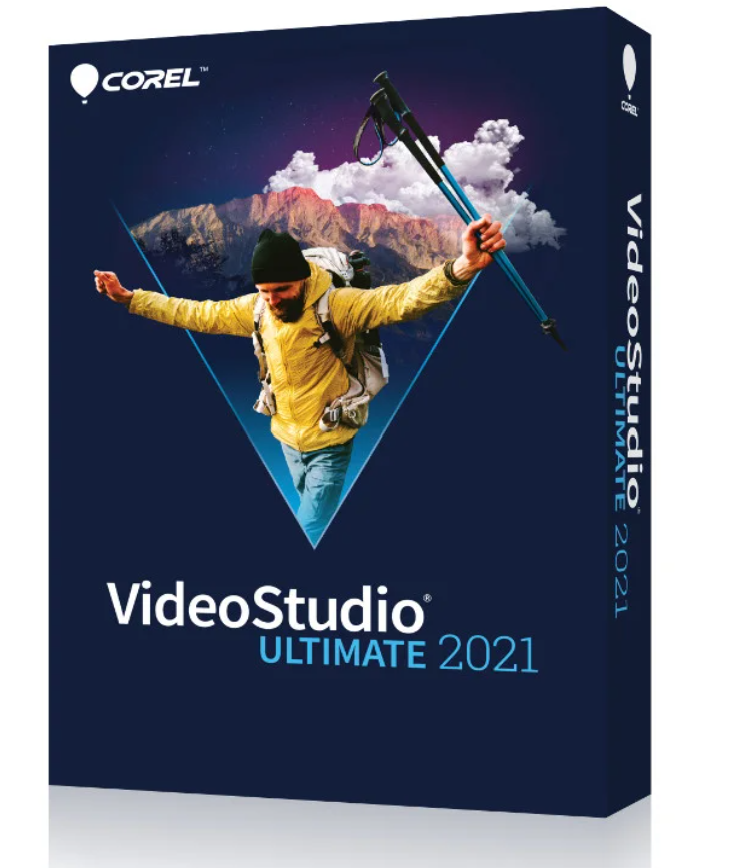
Video Editing Program.
Trust smart tools, an extensive collection of quality effects, powerful color grading, video masks, and enhanced performance to transform your best moments and experiences into unique movies.
Put your life in the spotlight.
The NEW VideoStudio Ultimate 2021 makes video editing easier and more fun. It includes drag-and-drop graphics, titles, and transitions, plus high-quality effects from industry leaders. Discover exclusive editing tools like color grading, video masking, advanced video stabilization, dynamic split-screen editing, and much more. Use intuitive tools and instant project templates to create unique movies that will impress and delight your viewers.
What does VideoStudio do?
Easily create stunning movies with the powerful tools and exclusive effects of this easy-to-learn video editing program.
Capture:
Import your own clips, capture the screen, or use the built-in tools to capture video from multiple cameras to create your most exciting movies!
Edit:
Go beyond basic editing with advanced features like color grading and video masking, experiment with over 2,000 customizable filters, and apply premium effects.
Share:
Export your projects in popular formats to share online and view on multiple devices, upload directly to YouTube, or burn to disc with a custom menu.
Everything you need to create great movies:
VideoStudio’s exceptional combination of a beginner-friendly interface, easy-to-follow tools, and helpful tutorials has been enhanced with groundbreaking creative features that make video editing even more fun!
Basic Editing:
Edit your videos using basic tools that allow you to effortlessly combine your photos and videos, then export them as engaging and compelling cinematic productions.
Drag-and-drop functionality:
Transform your footage into sophisticated movies by adding graphics, animated titles, and transitions. For example, convert titles into realistic handwriting or apply animated pen effects.
Edit and enhance
Enhance colors and use color grading to change the color palette of the entire video, make lens corrections, experiment with motion blur, and stabilize shaky footage—be amazed by the results!
Apply effects:
Apply fun effects and filters, mix creative overlays, and add morphed or transparent transitions, as well as dynamic and 3D titles to create stunning and entertaining videos.
Advanced tools:
Use video masks to create cinematic effects, showcase multiple perspectives with split-screen and multicamera effects, enhance panoramic shots with 360° video editing features, or add animation and speed effects.
What’s new in VideoStudio 2021:
Instant project templates:
Save time and effort by emulating the most popular video styles in minutes! Recreate trending viral videos or edit engaging social media posts with new instant templates and add themed intros, convert videos to portrait or landscape, copy marketing templates, and more. Unleash your creative potential by combining ready-made templates and effects with your own customizations for unique results.
AR Stickers:
Create original effects that enhance emotions and bring playful moments to your videos with the new AR Stickers. These facial recognition stickers are ideal for boosting reactions and making gaming videos, reaction videos, or tutorials more personal!
More Premium Effects:
Achieve unique creative transformations with streamlined effect packs from NewBlueFX and over 100 new VitaScene effects from proDAD. Go beyond basic editing with an expanded collection of exclusive premium effects from industry leaders!
Enhanced Video Stabilization:
With proDAD Mercalli’s simplified video stabilization tool, you can stabilize handheld shots and shaky videos faster and more effectively than ever before in real time. Quickly transform shaky videos and choppy action shots into usable footage!
Performance Improvements
Experience a faster, smoother editing workflow with significant performance improvements across the entire product. VideoStudio 2021 is optimized for the latest video hardware acceleration technologies from Intel, AMD, and NVIDIA, dramatically accelerating editing previews and rendering of the most popular file formats. With increased performance, improved rendering, and our most responsive user interface yet, VideoStudio 2021 is our best video editor to date.
Enhanced tools and features include:
Ultimate only, optimized video mask creation,
optimized split-screen editing,
improved motion adjustment controls, and
a new automatic motion blur.
A video editor packed with new features:
Get the results you want every time with VideoStudio’s comprehensive selection of innovative tools and features. Enjoy a complete video editing application that makes it easy to complete projects of all kinds.
Get creative with color.
Color grading:
Use intuitive controls to correct and enhance colors, brighten scenes, create mood with accent colors, and increase image brightness. Make colors pop with hue, saturation, and white balance controls, as well as automatic hue adjustments. Play with color to create unique projects.
Color grading:
Only Ultimate gives you access to comprehensive color grading tools to control the mood in any context. With multiple video zones and intuitive controls, you can move colors and fine-tune your edits effortlessly. Lighten scenes, influence mood with accent colors, and enhance the atmosphere of your films.
LUT profiles:
LUT profiles let you turn day into night, mimic the colors of famous films, and apply advanced color effects to your projects in a snap.
Quickly create slideshows and movies
. NEW Instant Project Templates
. Save big with the newly added Instant Project Templates. Select a template, then drag a video into the template to replace the placeholder that is automatically inserted into the timeline, and you’re ready to export your video.
The comic strip
Highlight Reel, a smart movie and slideshow maker with AI-powered facial recognition, automatically selects the best shots and clips and eliminates those with flaws or errors.
FastFlick
lets you create smart slideshows and movies in minutes! Simply select a template and insert the media you want.
Technical Specifications
: Operating System: Windows 10, Windows 8, Windows 7, 64-bit only.
Processor: Core i3 or AMD A4 series for standard video. Intel Core i7 or AMD Athlon A10 for HD and UHD video.
RAM: 4 GB or more; 8 GB or more recommended for HD and UHD video.
Graphics Card: Minimum screen resolution: 1024 x 768; at least 512 MB of VRAM recommended for hardware acceleration.
Sound card: Windows compatible sound card.
Hard drive space: Minimum 10 GB for a full installation.
An internet connection is required to install, register, and update the software.
Export formats
: Videos: AVC, AVI, DV, HDV, HEVC2 (H.265), M2T, MOV3, MPEG-1/-2/-4, UIS, UISX, WebM, WMV, XAVC S, 3GP.
Devices: Apple iPod/iPhone/iPad/TV, Android devices, Sony PSP/PS3/PS4, Nintendo Wii, Microsoft Xbox. Compatible formats: DV, HDV.
Disc: DVD, AVCHD, SD card, Blu-ray ($)
Internet: YouTube, Vimeo
Audio: M4A, OGG, WAV, WMA
Images: BMP, JPG
Import formats
Videos: AVCHD1 (.M2T/.MTS), AVI, DV, DVR-MS, HDV1, HEVC2 (H.265), M2TS, M4V, MKV, MOD1, MOV3 (H.264), MPEG-1/-2/-4, MXF, TOD, UIS, UISX, WebM, WMV
, XAVC
,
: CLP, CUR, DCX, EPS, FAX, GIF, ICO, IFF, IMG, J2K, JP2, JPC, JPG, MAC, MPO, MSP, PBM, PCT, PCX, PGM, PIC, PNG, PPM, PSD, PSPImage, PXR, RAS, TGA, TIF/TIFF, UFO, WBM, WBMP, WMF, Camera RAW
Accessories.
Creating DVD and AVCHD discs requires a DVD burner.
Blu-ray burning requires the purchase of a separate plugin within the application.
Supported languages:
English, French, German, Italian, Dutch, Traditional Chinese, Japanese.
Reviews
There are no reviews yet.