
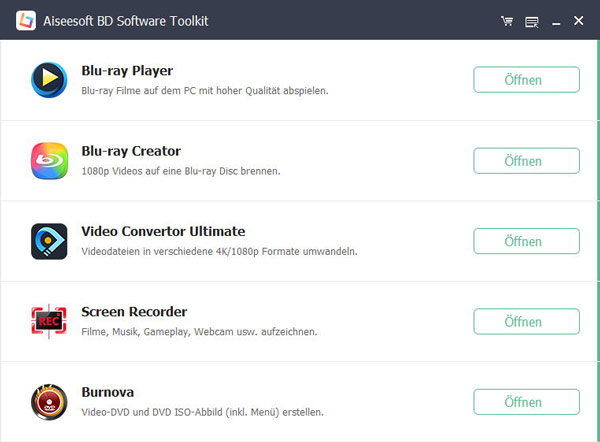
The Aiseesoft BD software suite consists of five products: Blu-ray Player, Blu-ray Creator, Burnova, Video Converter Ultimate, and Screen Recorder. With this software, you can easily convert and record videos, then burn them to Blu-ray discs or play them on your PC.

Play and create Blu-rays
Play a Blu-ray disc, folder, or ISO file on a PC; burn video files to Blu-ray

Burn the video to a DVD disc
Burn a video to a high-quality DVD, create a DVD ISO file from the video.

Convert and edit video
Quickly convert video and audio files, edit and trim video.
With this Blu-ray player, you can easily play Blu-ray discs, Blu-ray folders, and Blu-ray ISO images on your computer. The software also supports playback of 4K/1080p videos such as MP4, AVI, TS, MTS, and M2TS. Enjoy enhanced picture and sound quality and get the most out of your Blu-ray movies. An internet connection is required for Blu-ray playback.
Blu-ray Creator lets you create Blu-ray discs from your own video files. To better preserve large videos, you can convert and burn them to a Blu-ray disc, or convert them to a Blu-ray folder or ISO file for later use. The program supports BD-25 and BD-50, allowing you to burn virtually any video format to Blu-ray, including TS, M2TS, TP, TRP, MPG, MPEG, M4V, MP4, VOB, WMV, MXF, and more.
The toolkit also includes a DVD creator, Burnova, which can burn videos to DVD in high quality. Whether you’ve recorded a video with your camcorder or smartphone, or want to burn an online video to a DVD, you can use this software to create a video DVD. Burnova offers numerous DVD menu templates, and the background music and image can be changed. This allows you to create your own DVD and preserve your cherished memories.
With Video Converter Ultimate, you can easily convert video and audio files to all popular formats such as MP4, MOV, MKV, WMV, AVI, M4V, MP3, WAV, and WMA. The software also allows you to adjust video effects. You can cut and edit your videos to your liking.
The software also includes a screen recorder, allowing you to record video and audio on your computer. Whether you want to record online videos and music, or capture gameplay, webinars, or video calls, you can use this software. You can then burn the recorded videos to DVD/Blu-ray or watch them on your smartphone.

Preview/Snapshot
During video editing, you can preview the effects and take a snapshot.

High speed
Thanks to portable acceleration technology, the toolbox offers you high-speed conversion.

Video/audio editing
When creating a Blu-ray or DVD, you can edit the video, add an audio track and subtitles.

Profile settings
When converting videos, you can adjust the encoder, frame rate, bitrate, resolution, etc. according to your needs.

Numerous formats supported
Blu-ray Toolkit supports various video and audio formats when creating Blu-ray/DVDs and converting videos.

Easy screenshot
Thanks to the Screen Recorder, you can easily record everything on the screen and save it in high quality.
The All-in-One Blu-ray software for macOS meets all your video/DVD/iPhone needs.
✔ Convert video to popular 2D/3D formats on Mac ✔ Create
DVDs with video
on
Mac ✔ Copy
iPhone files to
Mac
✔ Import video, audio, and photos from Mac to iPhone
Mac Blu-ray software allows users to convert general 2D videos into 3D formats, including Anaglyph 3D, Side-by-Side (Half Width) 3D, Side-by-Side (Full) 3D, Top and Bottom (Half Width) 3D, and Top and Bottom (Full) 3D.
You can create 3D videos from 2D files on your Mac and then upload them to YouTube. You can also convert 2D videos into 3D video files for HTC EVO 3D and other 3D smartphones, tablets, or TVs.
With Mac Blu-ray Player software, you can enjoy virtually any Blu-ray disc released in different regions, Blu-ray folders saved on your Mac, or ISO files with HD surround sound. This software also plays the most popular SD and HD videos on your Mac.
The Blu-ray player for Mac can also play any 1080p HD video with excellent video quality. The DTS-HD Master Audio or Dolby TrueHD audio from the Blu-ray disc ensures perfect sound quality.
You can also create your own DVD on a Mac using any video you want to create, whether to store something precious or to give DIY DVDs as gifts. You can create DVDs with AVI, VOB, WMV, MP4, and even Flash Video (FLV), or convert popular videos to DVD Folder/ISO files.
Before creating, you can customize the DVD menu template, including the frame, text, and buttons; add an audio track/subtitles; and even change the background music and add an opening movie.
The Mac Blu-ray Software Toolkit allows users to share files between iPhone and Mac. You can directly import music, videos, ePubs, PDFs, and images from your Mac to your iPhone, and back up music, movies, photos, TV shows, podcasts, iTunes U content, ebooks, recordings, and voice memos from your iPhone to your Mac or iTunes.
You can also convert video files to iPhone-compatible video or audio files on your Mac and then transfer those files directly to your iPhone. You can also back up iPhone text messages and contacts to your Mac using the iPhone Text Messages & Contacts software.
Not satisfied with your iPhone ringtone? Have you heard songs you’d like to use as your iPhone ringtone? Aiseesoft iPhone Ringtone Maker for Mac offers a complete solution. The program can convert any audio and video file into an M4R ringtone for iPhone. After conversion, you can copy the created ringtones directly to your iPhone. This Mac application can also manage the existing ringtones on your iPhone.
Reviews
There are no reviews yet.